2-Channel Relay Board
Control high voltage devices easily with this 2-channel relay board, perfect for Arduino projects.
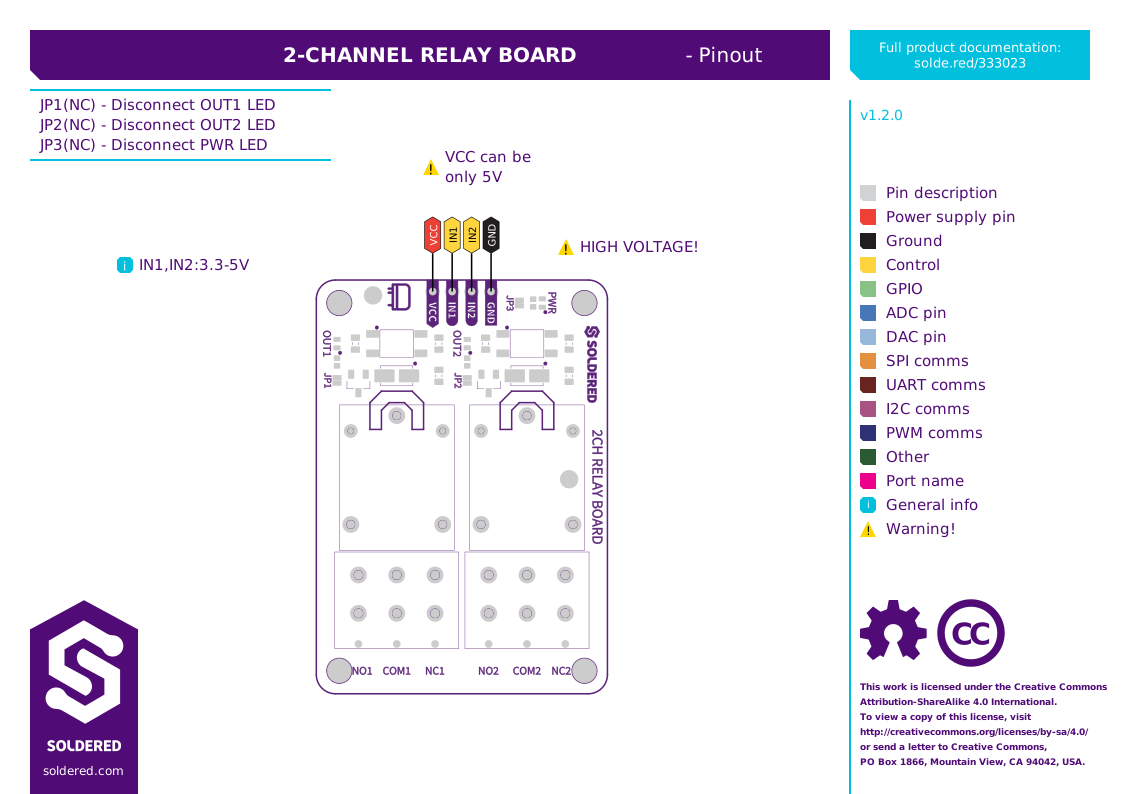
Did you ever wanted to turn on and off a device that needs large current or voltage? Whether operating on DC or AC, a relay is what you need. A relay is actually an electronic switch that is activated by a signal we send from a Dasduino or Arduino. This module further simplifies the whole process because it contains everything you need for the relay to work, and you just have to connect it to the microcontroller and power supply. You don't have to think about voltages and currents, insulation between high and low voltage or grounding, everything is already taken care of on the board. This product has 2 relays.
- Max. DC voltage and current: 30V, 10A
- Max. AC voltage and current: 250V, 10A
- Number of relays: 2 relays
- Dimensions: 54 x 38 mm / 2.1 x 1.5 inch
Interface
| Interface | Digital Gpio |
|---|---|
| Qwiic Compatible | No |
| Breadboard Compatible | Yes |
Power
| Supply Voltage Min V | 5 |
|---|---|
| Supply Voltage Max V | 5 |
| Logic Level | 3V3 Or 5V |
| Max Output Current A | 10 |
Other
| Ic Part Number | SRD-05VDC-SL-C |
|---|
Wire up to your microcontroller via ['digital_gpio'].
Add the Soldered library for your language (below).
Open the get-started example and read your first value.