Full product documentation, content & links
RS-232 Transciever Breakout
Communication & Wireless
›
Wired Communication
Interface
['uart']
Qwiic
No
The RS-232 Transceiver Breakout enables secure full-duplex communication with voltage levels from +3V to +15V, ideal for industrial use.
The RS-232 is a standard and very popular protocol for communication between two devices. It is a full-duplex protocol which means it can receive and send data at the same time, and data is sent at voltages from + 3V to + 15V for a digital "one" and from -3V to -15V for digital "zero". This provides a more secure environment for data transmission which is resistant to noise or interference, which is why the RS-232 is often used in industry. This module converts serial communication to RS232.
- Communication lines: TX, RX
- IC:232 MAX
- Voltage: 3.3V - 5.5V
- Dimensions: 38 x 38 mm / 1.5 x 1.5 inch
Interface
| Interface | Uart |
|---|---|
| Qwiic Compatible | No |
| Breadboard Compatible | Yes |
Other
| Ic Part Number | MAX232E |
|---|
Start Here
1
Connect
Wire up to your microcontroller via ['uart'].
2
Install the library
Add the Soldered library for your language (below).
3
Run an example
Open the get-started example and read your first value.
ArduinoC++
What's in the Box
1×
RS-232 Transciever Breakout (main product) 333067
1×
Header pins (unsoldered)
Header pins included for all breadboard-compatible pins
Pinout
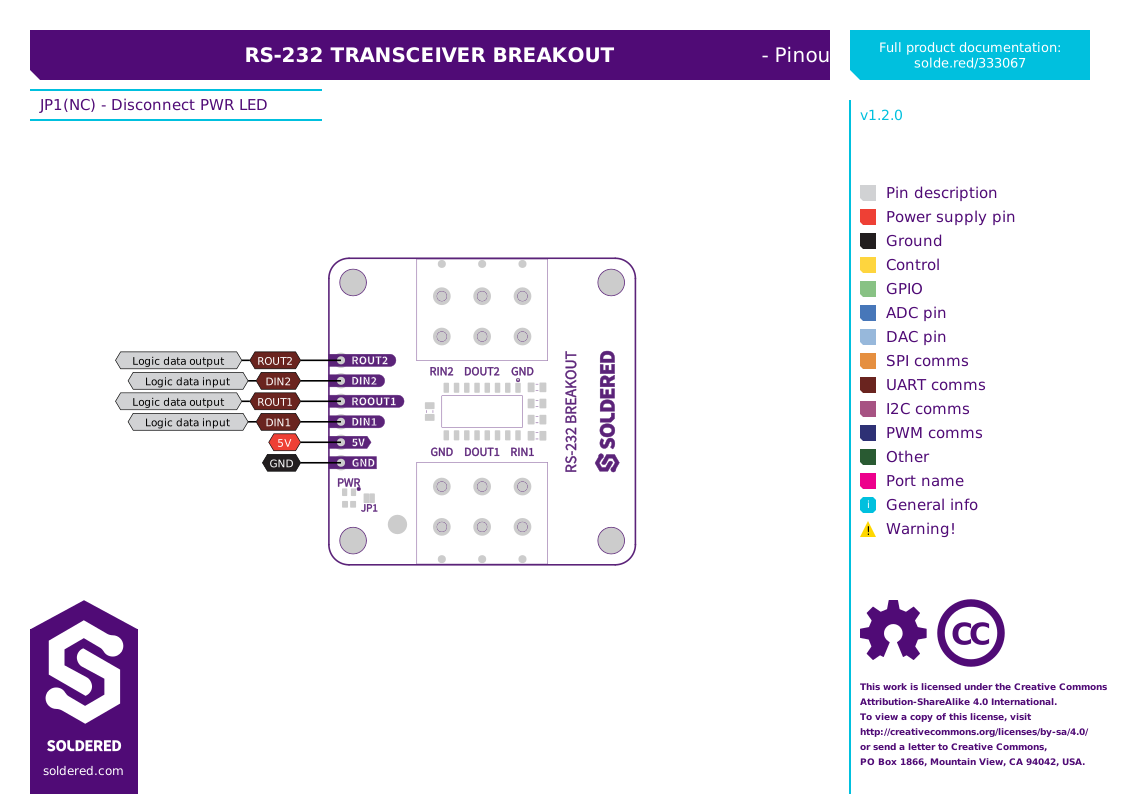
Last updated:
Technical Resources
2 resources
Documentation
2 resources
Software Resources
1 resource
Arduino
Arduino: Get Started
DOCS